
Appearance
Getting Your Certificate
Where your certificate appears, why it never arrives by email, and how to get it back if you closed the page.
Certificates are not emailed
This surprises people, so it's the first thing to know: no email arrives with your certificate attached. There is nothing to wait for and nothing to look for in your inbox.
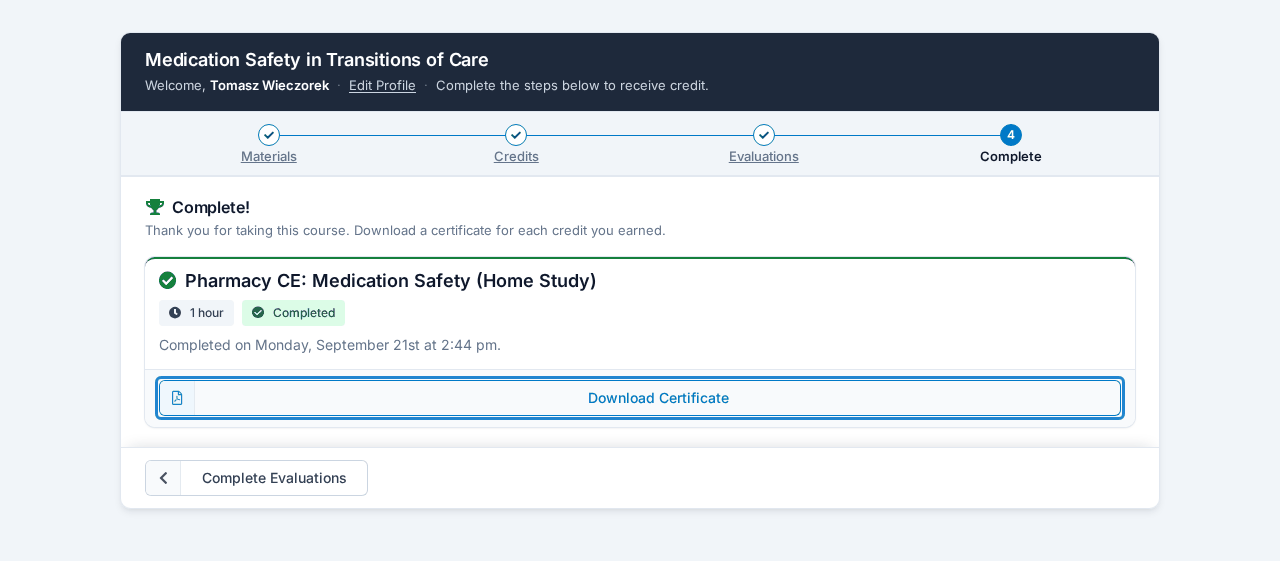
Your certificate is generated the moment you finish the course. The final step is headed Complete! and has a Download Certificate button for each credit you earned. Download or print it there and then.
On a course with several parts, every part has its own final step. You collect certificates part by part, as you submit each one.
Save it when you see it
Download the file and keep it somewhere you'll find it again. You can always come back for another copy, but that takes a few more steps than saving it the first time.
Getting a certificate again
If you closed the page, or you need a copy months later, there are two routes back.
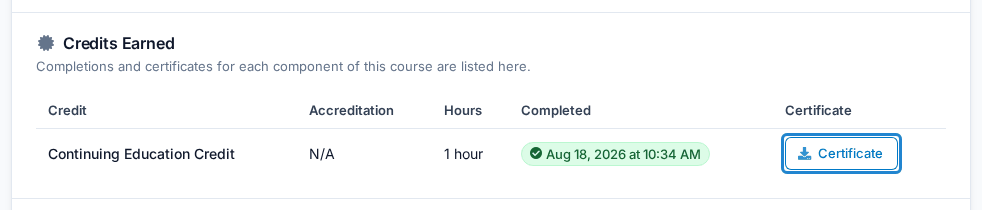
From your Learning History — the easier one, if you have an account. Sign in at lecturepanda.com, open the course from your history, and the certificate for each credit is on that page under Credits Earned. See Your Account & Learning History.
From the course itself — request a new access link from the course registration page, follow it back in, and return to your final step, where the download buttons are waiting. On a course with several parts, press Review This Part on the part you want, then go to its last step, Complete.
Your course provider can also send it to you directly if you'd rather ask.
Learning History is the more reliable route
If a course was edited after you finished — an evaluation replaced, for instance — going back in through the course can occasionally ask you to redo something before it shows the certificate again. Learning History goes straight to the certificate and avoids that.
There's no certificate on my completion page
A certificate is only offered if your course provider attached a certificate template to that credit. If you completed everything and no download link appeared, that assignment is usually missing on their side.
Contact them, say which course and which credit, and they can attach the template. Your completion record is already saved, so nothing needs redoing — the certificate becomes available once they've made the change.
The name on my certificate is wrong
Fix your name before you save a certificate you intend to keep, and before your credit is reported to an accreditor.
- On the course — use the Edit Profile link at the top of your course page. (On a course with several parts, open any part first; the Parts list doesn't have the link.)
- On your account — sign in at lecturepanda.com and update your profile, then update the name on each existing registration so the certificates regenerate correctly.
Your course provider can also make the change for you. Once your name is corrected, download the certificate again — certificates are re-rendered when you access them, so the new copy carries the corrected name.
The date on my certificate looks wrong
If the date shown isn't the date you completed the course, that's a setting in the template rather than anything about your record. Tell your course provider what date you expected and what the certificate shows; they can correct the template, and re-downloading picks up the fix.
Related
- Your Account & Learning History — the easiest way back to an old certificate
- When Your Credit Gets Reported — a certificate and a reported credit are separate things
- Working Through a Course — why claiming a credit alone produces no certificate