
Appearance
Quizzes & Evaluations
Attempts, passing scores, and why the Submit button sometimes refuses to light up.
Quizzes and evaluations are different things
Both appear at the Complete Evaluations step, and both have to be finished before you can submit. The list is split into To do and Completed. On a course with several parts, each part has its own list, and you only see the quizzes for the part you are in.
- Quizzes are graded. They have right answers, a passing score, and a limited number of attempts.
- Evaluations and surveys aren't graded. There are no wrong answers and nothing to pass — you just have to complete them.
Some courses also pop questions up during a video. Those are for engagement, aren't graded, and can't be retaken — they don't affect whether you pass. Your provider can require them, though; then the video won't show as complete until you've answered them.
The Submit button won't activate
The Submit button in the bottom bar stays inactive until every quiz and evaluation on your list is complete — the bar says "Finish every evaluation to continue." One unfinished item anywhere blocks it.
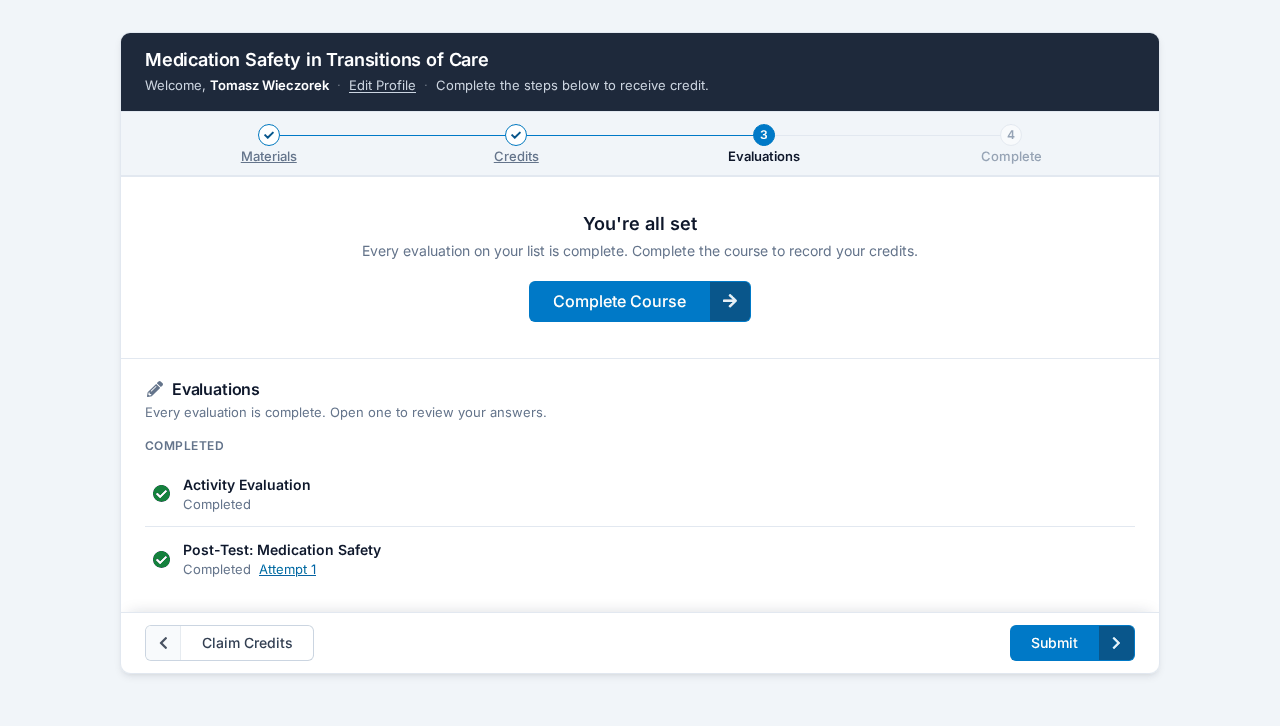
Once everything is done, a panel headed You're all set appears on the step with a large button. It reads Submit Credits if your credit is reported to an accrediting body, and Complete Course if not. It does the same job as Submit in the bottom bar. Either one may first ask "Are you completely done selecting your credits?" if there are credits you haven't claimed — click Back to Credits to claim them, or Yes, I'm completely done. to carry on. Credits you leave unclaimed at that point are locked.
Go back through the Complete Evaluations step and look for anything not marked complete. It's easy to miss an evaluation below the fold, or a second quiz you didn't realize was there.
If your list contains something you can't complete
Occasionally a course asks you for a quiz that belongs to a different group of attendees — the other session's exam, or an assessment for a different profession. You can't finish it, and it blocks your submission.
That's a setup problem, not something you did. Tell your course provider which quiz is showing up and they can correct who it's aimed at; it then drops off your list.
You've used all your attempts
Quizzes have an attempt limit set by your course provider. When you run out, the quiz closes and shows as failed.
Only your course provider can give you another attempt. They do it by raising the attempt limit on the quiz, which takes a moment. Contact them and say which course and which quiz — see Getting Help.
You can't retake a quiz you passed
If a quiz won't reopen, check your result first. Once you pass, the quiz closes for you permanently, even if you had attempts left over. That's deliberate — your result is locked in and you don't need to sit it again.
So "it won't let me retake it" usually means you're already done. If you wanted a higher score than the one you got, that isn't something that can be reopened.
Your score looks wrong
If a score displays oddly when you look back at a completed attempt, check whether the course still shows you as having passed. If it does, your result recorded correctly and the display is the only problem — your credit is safe. Mention it to your course provider so they can confirm the recorded score.
Related
- Working Through a Course — what unlocks each step
- When a Video Won't Complete — if a video is what's blocking you
- Getting Your Certificate — what happens once you submit