
Appearance
Summary
The course's setup at a glance: the numbers, where it stands, and one line for every page of the menu.
This page is for the course builder
It describes the Summary page you see after switching with Try the new version. See The Course Builder for how to switch and where the classic settings went.
The Summary is the first row of the menu and the page you land on when you open a course. It is read-only: nothing is edited here. Every row says how one page of the menu is set up and opens that page, which is where you change it.
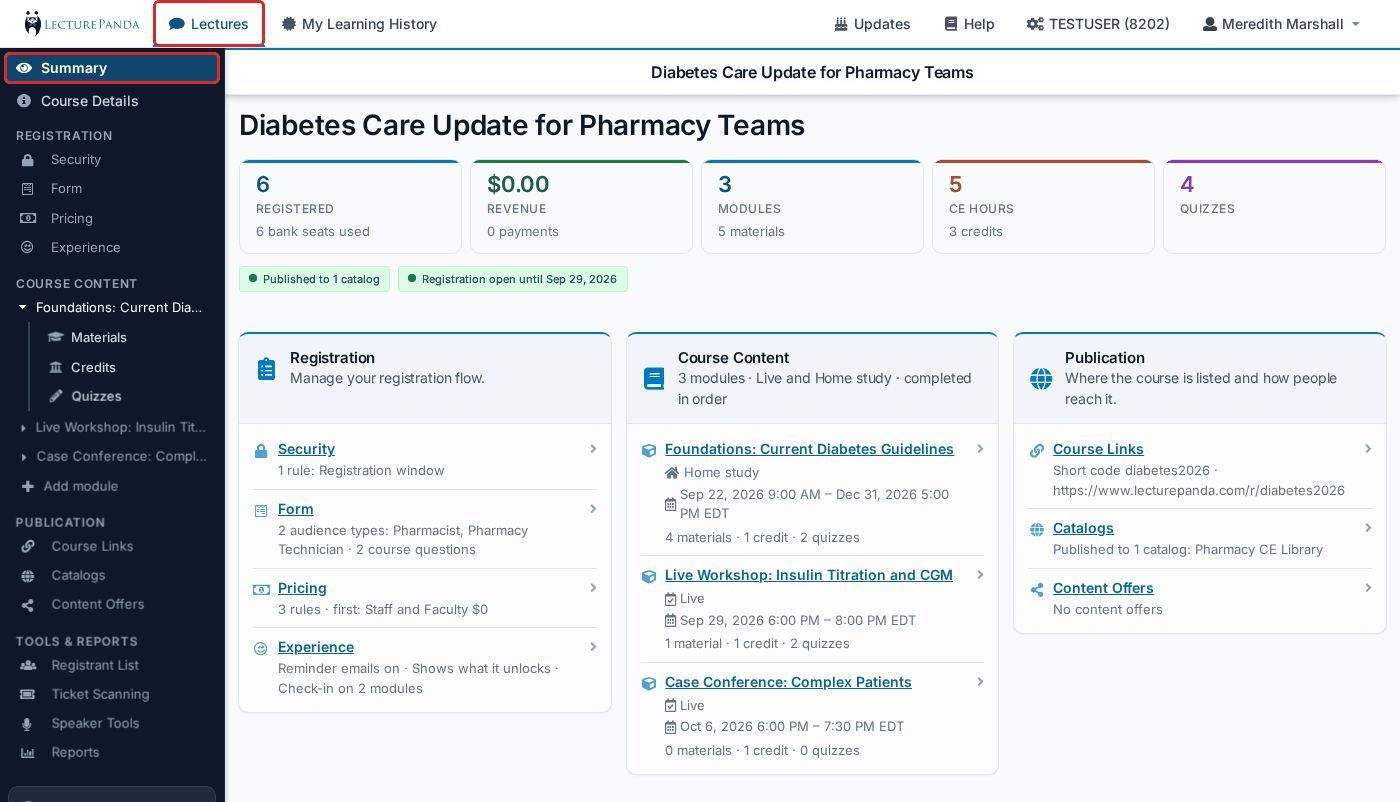
The title and the tiles
The course's title heads the page. To change it, go to Course Details.
Under it is a row of tiles:
- Registered — how many people have registered, with the number of bank seats used beneath. Click it to open the Registrant List. You only see this tile if your role can manage participants.
- Revenue — what this course has earned you, after refunds, with the number of payments and the amount refunded beneath. It appears once the course has a pricing rule or has taken a payment, and only for roles that can see payments. On a Marketplace course it is your share, not the full sale.
- Module / Modules — how many modules the course has, with the number of materials across them.
- CE hour / CE hours — the total hours across the course's credits, with the number of credits.
- Quiz / Quizzes — how many quizzes the course has.
Credits and quizzes belong to modules, so those tiles are counts only. Open a module under Course Content to work on them.
Where the course stands
Two chips sit under the tiles:
- Published to N catalogs or Not published — click it to open Publication › Catalogs.
- Registration open, Registration open until date, Registration opens date, or Registration closed — this follows the Registration window rule. Click it to open Registration › Security.
The three cards
The rest of the page is the menu's groups as three cards. Each row is a page's name, one sentence saying how it is set up, and an arrow into it.
Registration
"Manage your registration flow."
| Row | What the sentence tells you |
|---|---|
| Security | How many rules are on and which ones — or "No rules — anybody with the link may register" |
| Form | The registration types on the course by name, and how many course questions are asked |
| Pricing | How many pricing rules there are and the first one — or "No pricing rules — the course is free" |
| Experience | Whether reminder emails are on, whether the course shows what it unlocks, and where check-in is taken — "Check-in on 2 modules", counting every module that takes it, or "No check-in" |
Course Content
The card's heading says how many modules there are, the mix of settings ("Live", "Home study" or "Live and Home study") and, with several modules, whether they are "completed in order" or "any order".
Each module is a row: its name, its setting and dates, and what it holds — for example "2 materials · 1 credit · 1 quiz". Click a module to open its settings page. See Course Modules.
Publication
"Where the course is listed and how people reach it."
| Row | What the sentence tells you |
|---|---|
| Course Links | The short code and short registration link, or that there is no short code yet |
| Catalogs | The catalogs the course is published to, by name — or "Not published to any catalog" |
| Content Offers | How many content offers there are — or "No content offers" |
Related
- The Course Builder — the whole menu, and where each classic setting went
- Course Details — the title, description, time zone, speakers and outline