
Appearance
Experience
Registration › Experience: what a registrant gets from the course after they sign up — the flyer, the reminder emails, and what they see when they finish.
This page is for the course builder
It describes the Experience page in the Registration group, which you see after switching with Try the new version. On the classic pages the flyer is on the Publication tab, and the two switches are the Disable Follow-Up Reminder Emails and Hide Next Lectures checkboxes at the bottom of the Details tab. See The Course Builder for the full map.
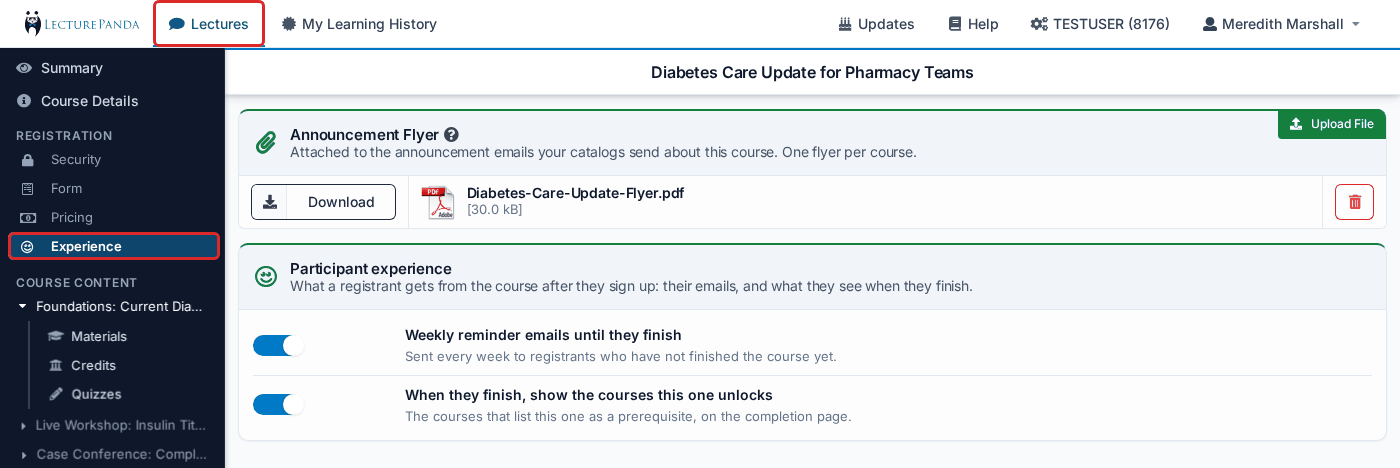
Announcement Flyer
"Attached to the announcement emails your catalogs send about this course. One flyer per course."
Upload a flyer and it is attached to the emails a catalog sends about this course, and offered for download on the course's announcement page; it is not sent to registrants. A course has one flyer: uploading a second one replaces the first. The maximum file size is 10MB.
See Publishing & Sharing for when those emails go out.
Participant experience
"What a registrant gets from the course after they sign up: their emails, and what they see when they finish."
Two switches. Each saves as soon as you flip it, and on means the thing happens.
Weekly reminder emails until they finish
Sent every week to registrants who have not finished the course yet. Turn it off for a course where a reminder has no point — a live webinar that no-shows cannot complete afterwards, for example. See Emails LecturePanda Sends for exactly when reminders go out.
When they finish, show the courses this one unlocks
The courses that list this one as a prerequisite, shown to the participant on the completion page. Turn it off to hide that list.
The switches read the other way round from the classic pages
The classic checkboxes are Disable Follow-Up Reminder Emails and Hide Next Lectures — ticking them turns the feature off. Here the switches are positive: on means reminders are sent and the unlocked courses are shown. They are the same two settings, so a course with Disable Follow-Up Reminder Emails ticked shows the first switch off.
Not on this page
- Check-in is set on each module: module settings › Additional settings › Check-in. See per-module check-in. The Summary's Experience row still tells you where check-in is taken.
- The wording of the button in learner emails belongs to the registration type — Course Button Label, in the Emails section of the registration type form.
Related
- Emails LecturePanda Sends — every email a learner gets, and when